









Troubleshooting: Bootstrapping the MDR over an existing ShowVoc instance: dealing with the "UNKNOWN"
The mysterious UNKNOWN resources
Upon accessing any ShowVoc or VocBench version (>= 15.0 and 6.0 respectively) you will notice the introduction of a revamped MDR and, most importantly, that this new MDR is now a central component in the system, directly storing all relevant information about datasets, versions, distributions, available downloads, etc..
If you are already a ShowVoc/VocBench user, you will probably have lots of existing projects and their reflection in the MDR will have generated some strange "UNKNOWN" and "unknown" strings, which can also be seen in the title of the project, when it is accessed by users. Why that? Well, the reason is twofold:
by first, why "unknown"? because the new version of the MDR component and of its associated eponymous vocabulary introduced new concepts, some of them coming from the DCAT-3 vocabulary and others being coined within MDR itself, which were not represented in the previous versions of the platforms. As a consequence, in lack of information, we had fields to fill with unknown values. However, and here we come to the second point, we did indeed bootstrap them with some basic values, e.g. the notion of DatasetArchetype (i.e. the "abstract" notion of a dataset, not bound to any version or distribution of it) has been introduced as a mandatory element and its title has been bootstrapped with the title of the project from which it originated, with the addition of that UNKNOWN string.
Then why adding that "UNKNOWN" string to all the titles? That's because that information is still incomplete: before these new releases, you might have mapped different versions of a dataset onto different projects, and there was nothing binding them together under a common umbrella. The bootstrapping procedure of the new MDR for aligning data to the new version has thus automatically generated a new DatasetArchetype for each existing project. The important information that you can add as an administrator, knowledgeable of the nature of each project, is to bind different projects that represent different versions of the same dataset or different distributions of the same versions of it under the common umbrella of the same dataset. What should typically happen is that one generated DatasetArchetype will be kept and its title will be corrected to a proper one, while those generated from other projects representing different versions or distributions of the same dataset will be merged into the first one. So, we opted for an explicit marker for users, raising the alert flag for grounding that additional information with values (whereas leaving the generated title with the project name would have not clarified that some input is needed).
A guide to reorganizing your pre-existing data
We provide here a simple guide on the actions to perform in order to organize your pre-existing set of projects into a well managed set of datasets.
Before starting, some info about the terminology being adopted, summarizing info that is sparse across the manuals:
- dataset (more precisely, dataset archetype as a MDR class). Now you can define a notion of dataset, as an abstract, archetypical, reference to it. E.g. EuroVoc is EuroVoc, it's not version 4.5, it's not released on 2026-04-05, and it's not the SKOS-Core distribution: it's just EuroVoc. This archetype notion should act as an umbrella for all versions, distributions etc... of EuroVoc
- shard. it's a notion of repository (i.e. different piece of data) that can be hosted within a same project. Usually (but not limited to), a shard is associated with a version of the dataset (more precisely, with a distribution of a version of the dataset. the one that is hosted within the project). So, yes, now a project can host multiple versions, without requiring the build up of a new project each time
- project. Same as before, with the aforementioned exception of being able to store several versions
With the double objective of:
- virtuously modeling even data organized with the old versions of VB/SV (i.e. different versions --> different projects)
- still account for the necessity, that might happen even in the future, of representing two different versions with different projects (e.g. an OWL ontology becomes a SKOS thesaurus, still being the same content and, from an abstract point of view, the same dataset)
- allow for more versions of a same dataset to be hosted within the same project
- allow for more versions of a dame dataset sparse across different projects
Mixed configurations are also allowed, e.g. dataset A, with versions Av1, Av2, Av3 of which Av1 is in project AP1 and Av2 and Av3 stored in project AP2. What will happen is that there will be a single dataset (say A) listing the three versions, and the user will see listed all of Av1, Av2, Av3, seamlessly under A. Whenever the user switches from a version to one another, if the project needs to be changed, VB and SV will do that transparently, without any additional action required by the them.
Obviously, what we expect is that "a regime", and in lack of very particular needs such as the OWL–>SKOS mentioned above, users would simply go for the first case: all versions hosted on the same project. Yet, it remains open to all possibilities.
The recipe
As a preliminary step, let's clear out the meaning of the various "UNKNOWN" and "unknown" and what is shown in the UI
- when opening any project, the larger title shown in ShowVoc is no more the project name; it is the dataset name which, as mentioned earlier, in lack of any information, has been bootstrapped with the project name. The title is also visible in the MDR page (both in VB and SV), next to the folder icon
- As explained, the UNKNOWN before the Dataset name is a temporary marker put by the bootstrapping procedure to highlight the fact that the title has just been generated from the project and might probably require a human revision. You can remove that UNKNOWN and also remove any special character (e.g. underscores "_") that was needed by project names; you can use spaces etc... Being a name for the dataset as a whole, you will probably want to remove any additional code that you used for the project name to better identify it and to distinguish it from other projects holdiong other versions of the dataset
- the lowercase "unknown" is the version name. You can see it both in VB and SV in the MDR page, in the names of versions under each dataset and on the project main page, next to the dataset name. About this last one, in ShowVoc, if you have various versions of the same dataset, it becomes a combobox allowing you to select the version you want to move to while in VB you will be redirected to the versions management page
To clean up your data: from the metadata registry, you can perform several operations:
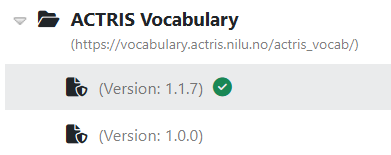
- let's take the example of a dataset with all "unknowns" in its description (both title of the dataset and of the only available version), just migrated to the new MDR. As you can see in the figure below, the version is the one with the little doc icon under the main entry with the folder, and the folder is the dataset (archetype)

- if you click on the dataset, you will see on the right of the MDR page, something like the figure below:
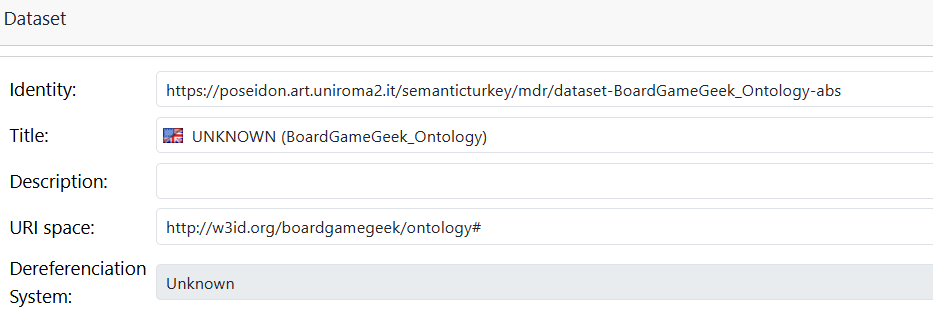 from there, you can change the name, removing the UNKNOWN, and you will see now the following:

- We need now to set that little "unknown": just click now on the version entry under the dataset. On the right of the MDR you will see:
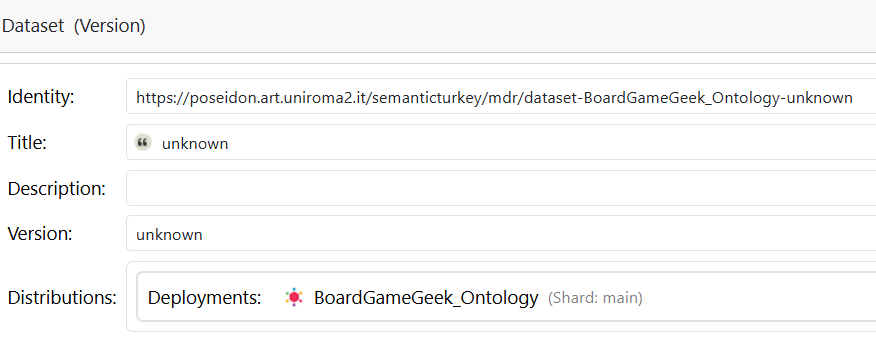 change title and version to:
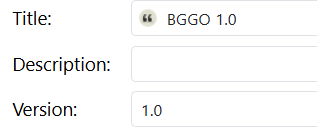 and, after forcing a refresh of the dataset tree on the left, you will see this:

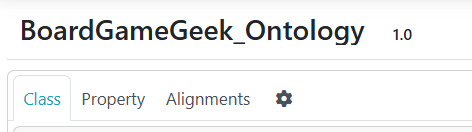
- Now, open the project. In ShowVoc, the title will look like this:
- Let's take now one last step ahead: merging multiple DatasetArchetypes. As mentioned earlier, the bootstrapping procedure has generated, for each project, a new, unknown, dataset. However, there are probably many projects representing different versions of the same dataset and thus you might want to bring all of them under one of the generated Datasets, discarding the others. There is a "Merge into another dataset" option, so all versions of the two datasets will be reported under the absorbing dataset that is left after the merge
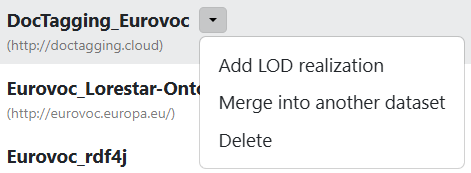
Photo finish
This is how multiple versions appear in the MDR:
 while this is what can be seen from inside the project page in ShowVoc:
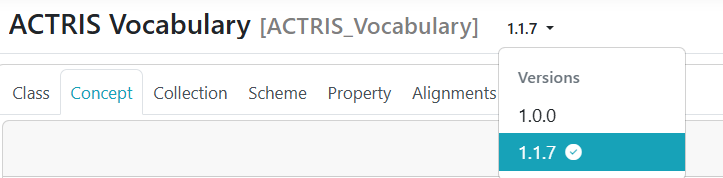 You can observe three main elements
- the main title, "ACTRIS Vocabulary", in bold, black color: this is the title of the dataset
- with smaller fonts, in grey, the project name. If the project name and the dataset name are exactly the same, only the dataset name is shown.
- the different versions, which can be selected through a combobox. The default version that will be accessed when opening a project is:
- in ShowVoc, the current one, marked with a checkmark next to it.
- in VocBench, the master version (the one - always evolving - being edited)