








Machines management
Introduction
The Machine Administration page allows the administrator to register and manage machines, namely external applications or services that need to interact with the system.
Machines are typically used for Machine-to-Machine (M2M) communication, where an application accesses the backend APIs without user interaction, authenticating through dedicated credentials (typically a client secret).
This page is basically split in two sections: the left one lists the registered machines and the right one shows their details.
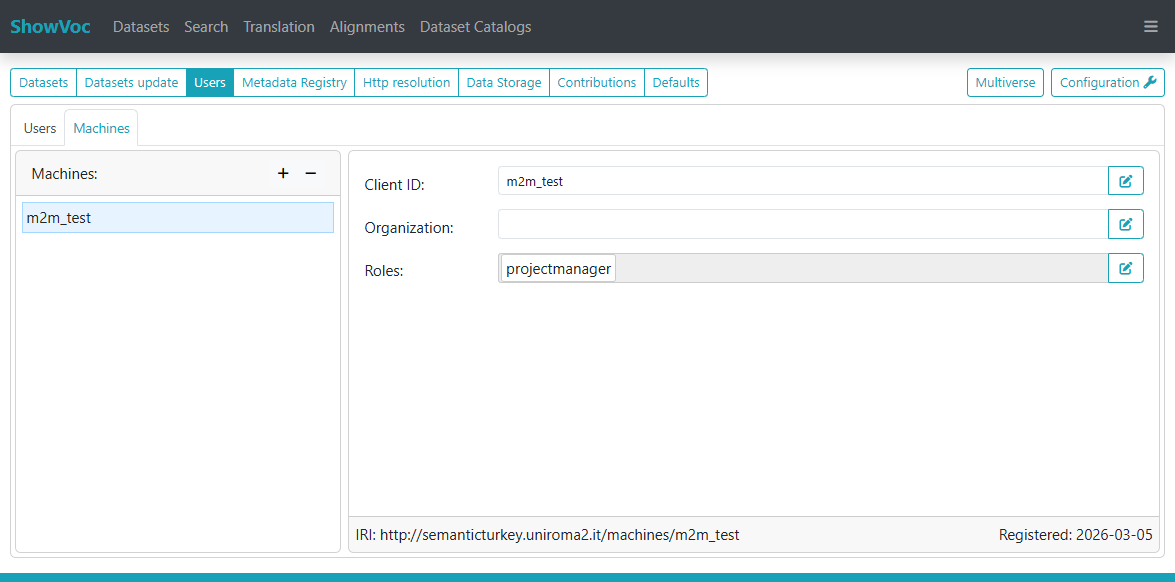
New machines can be created by specifying a Client ID and, optionally, the name of the associated organization. The Client ID is a fundamental element in the M2M authentication flow, while the organization is only descriptive and does not affect the communication with the backend.
When a machine is selected in the Machines panel, its details are shown in a panel on the right side of the page.
From this panel it is possible to manage the roles assigned to the machine. Roles can be added or removed and determine which APIs the machine is allowed to invoke.
M2M configuration
In order to enable Machine-to-Machine (M2M) communication, OAuth2 must be properly configured in Semantic Turkey. This aspect is described in detail in the OAuth2 configuration section.
Note that such configuration also describes how to enable OAuth2 login for ShowVoc users. However, this is not required for M2M communication: it is sufficient to have a valid OAuth2 configuration in place and a properly registered client.
For each registered machine, a corresponding client (with the same Client ID) must be defined in the OAuth2 provider (e.g. Keycloak).
The access token issued by the provider for this flow must satisfy the following requirements:
- it must include, as audience (aud claim), the Client ID associated with the Semantic Turkey application registered in the OAuth2 provider;
- it must include a claim containing the Client ID of the machine.
Since there is no universal standard across providers for naming this claim, Semantic Turkey looks for the Client ID in one of the following claims: client_id, cid, or appid.
If none of these claims is provided by the OAuth2 provider, a custom claim must be configured in the provider in order to include the Client ID in the issued token.
Initializing M2M communication
Once the machine and the OAuth2 client are properly configured, it is possible to obtain an access token using the Client Credentials flow.
The access token can be obtained by sending a request to the OAuth2 provider token endpoint, for example:
      POST https://<IAM_HOST>/realms/<REALM>/protocol/openid-connect/token
      Content-Type: application/x-www-form-urlencoded

      grant_type=client_credentials
      &client_id=YOUR_CLIENT_ID
      &client_secret=YOUR_CLIENT_SECRET
The response will contain an access_token that must be included in the Authorization header of subsequent requests to the Semantic Turkey APIs:
Authorization: Bearer <ACCESS_TOKEN>
When the token expires, a new one can be obtained by repeating the same request.